
⚡ Quick Verdict
★★★★½
GoHighLevel WhatsApp integration is a game-changer for businesses outside the US. It brings WhatsApp — the world’s most used messaging app with 2 billion users — directly into your GHL CRM, inbox, and automations. For agencies in Pakistan, India, Middle East, and Asia, this is not optional — it is essential.
✅ Best For
- Agencies with international clients
- Pakistan / India / Middle East businesses
- High-volume lead follow-up
- WhatsApp automation at scale
❌ Skip If
- US-only audience (SMS works fine)
- Very low monthly message volume
- No WhatsApp Business API access
- Not yet on GoHighLevel
Full platform access · Cancel anytime
If your customers are in Pakistan, India, the Middle East, or anywhere in Asia, you already know the truth: nobody checks email. Nobody reads SMS. But everybody reads WhatsApp.
In 2026, WhatsApp has over 2 billion active users across 180+ countries. In many markets, it has completely replaced email, SMS, and even phone calls as the primary way customers communicate with businesses. GoHighLevel recognized this and built native WhatsApp support directly into its platform — no third-party Zapier connections, no hacky workarounds.
In this guide, we cover exactly how the GoHighLevel WhatsApp integration works, how to set it up step by step, what it costs, how to use it in automations, and whether it is worth it for your agency or business.
What Is the GoHighLevel WhatsApp Integration?
The GoHighLevel WhatsApp integration connects the official WhatsApp Business Platform (powered by Meta’s Cloud API) directly into your GHL account. This means WhatsApp conversations appear in your GHL Conversations inbox, are tied to contact records, and can be used in workflows alongside email, SMS, and calls — all from one dashboard.
This is not a third-party plugin or a Zapier connection. GHL built WhatsApp natively into its system, which means:
- WhatsApp messages appear in the same inbox as SMS, email, and calls
- Contact records update automatically when someone messages you on WhatsApp
- You can trigger automations based on WhatsApp replies
- Agencies can resell WhatsApp to clients and charge monthly fees
- WhatsApp Coexistence lets you use the same number in both the WhatsApp app and GHL simultaneously
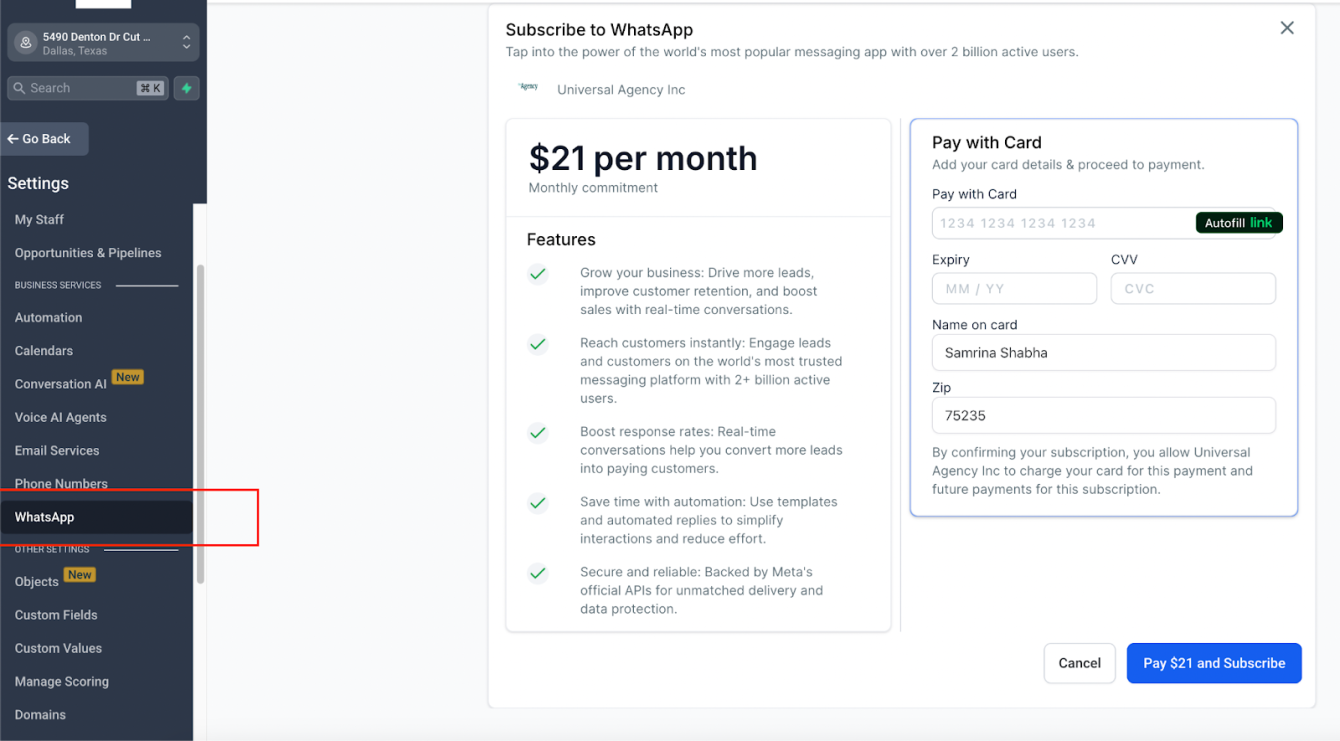
GoHighLevel WhatsApp Setup: Step-by-Step Guide
There are two methods to connect WhatsApp in GoHighLevel. Method 1 is the official native integration. Method 2 covers third-party options for markets where the official API has restrictions.
Method 1: Official WhatsApp Business API (Recommended)
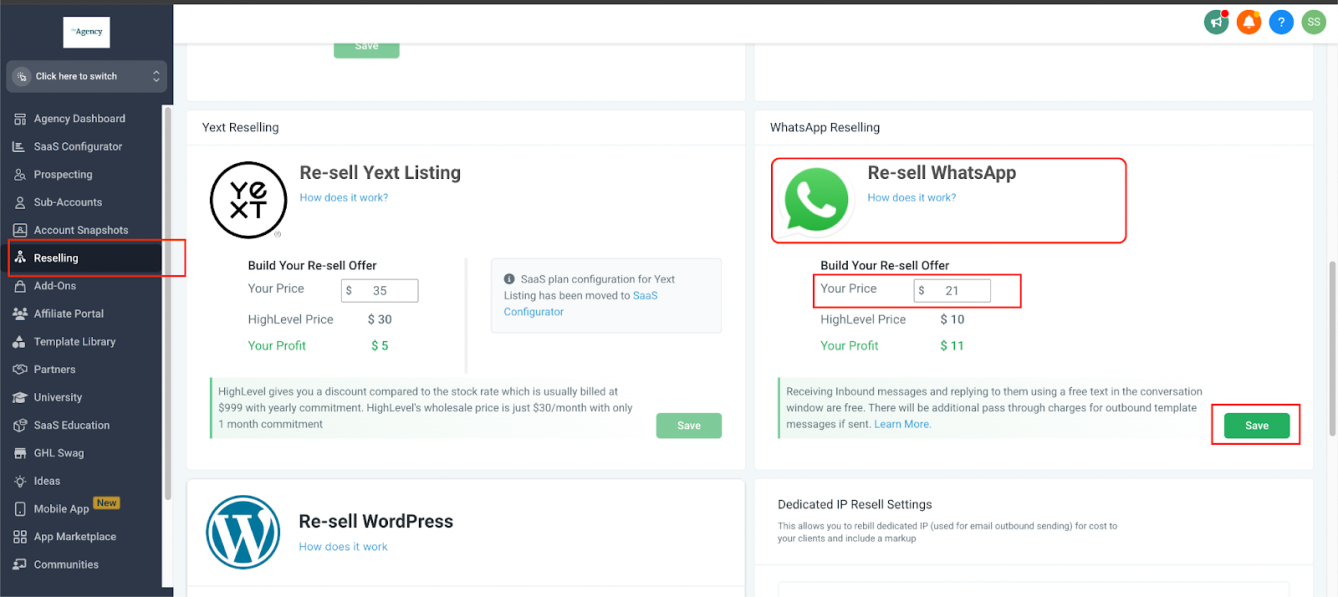
Go to Agency Settings → Reselling Tab
In your GHL Agency Dashboard, navigate to Settings → Reselling. Here you set your agency-wide WhatsApp pricing before offering it to clients. Connect your Stripe account so GHL can bill you and you can bill your clients automatically.
Enable WhatsApp for a Sub-Account
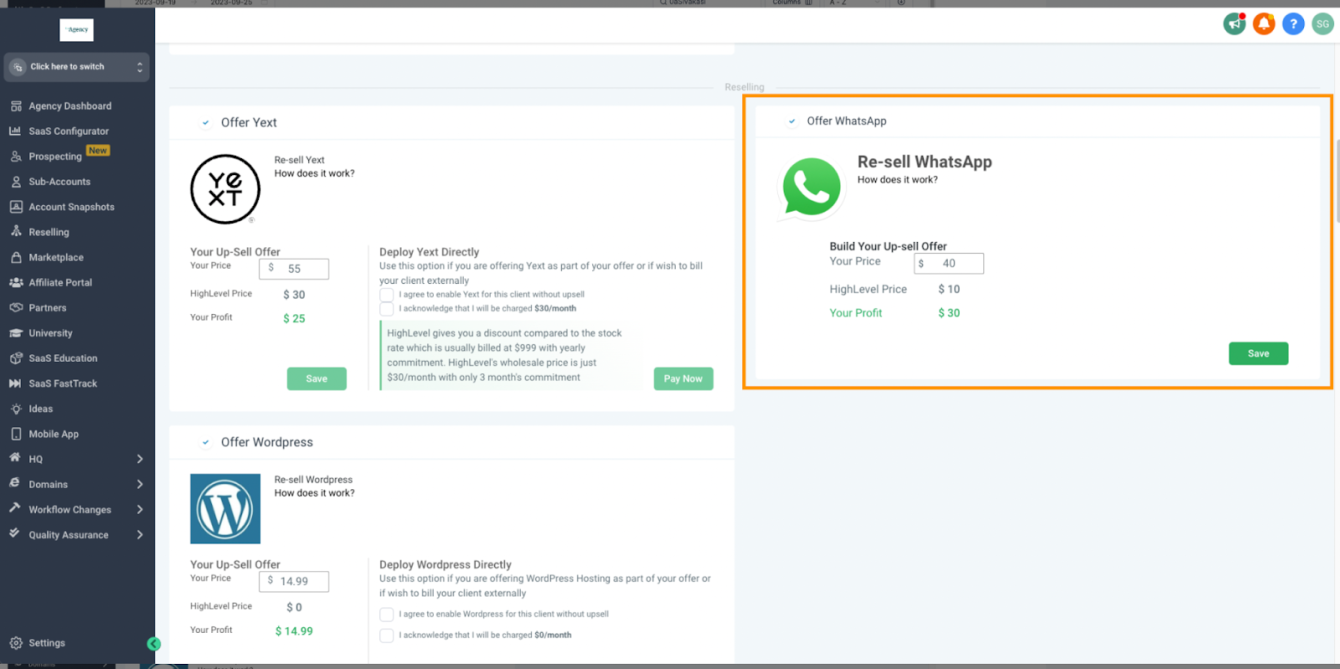
Go to your Sub-Account List, find the client account, click the three dots → Manage Clients → Reselling Section → Enable WhatsApp. Set the monthly price you want to charge your client.
Client Completes WhatsApp Signup
After purchase, your client is redirected to the WhatsApp signup page. They connect their Facebook Business Manager and verify their WhatsApp Business number. GHL walks them through this with an Embedded Signup flow — no developer required.
Verify Your Phone Number
You must use a new phone number or an existing number that is NOT currently active on WhatsApp or WhatsApp Business App. Once migrated to the Business Platform, it cannot be used on the regular WhatsApp app at the same time (unless you enable Coexistence — see below).
Enable WhatsApp Coexistence (Optional)
WhatsApp Coexistence lets you use the SAME phone number in both the WhatsApp Business App and GoHighLevel simultaneously. This is powered by Meta’s Cloud API. Go to Settings → Phone Numbers → enable Coexistence for your WhatsApp number.
Create WhatsApp Message Templates
For outbound messages or messages sent outside the 24-hour reply window, you need pre-approved templates. Go to Settings → WhatsApp → Templates → Create Template. Submit to Meta for approval (usually takes a few hours). Templates can be Marketing, Utility, Authentication, or Service type.
Test and Go Live
Send a test message from the Conversations inbox. Verify that inbound messages appear correctly and that your contact records are updating. Once confirmed, your WhatsApp channel is live and ready for automation.
Method 2: Third-Party WhatsApp Integrations (For Restricted Markets)
If your region has restrictions on the official WhatsApp Business API, several third-party tools connect WhatsApp to GHL without needing Meta Business verification:
- WAGHL — $29/month per sub-account, unlimited messages, QR code setup, no template restrictions. Popular in Pakistan and South Asia.
- WhatsLevel — Routes WhatsApp through GHL as a custom telephony provider. More technical setup required.
- Wazzap — Latin American-focused, QR code based, unlimited messaging without official API.
How WhatsApp Messaging Works in GHL
The 24-Hour Conversation Window
WhatsApp has a strict 24-hour messaging rule that every GHL user must understand. When a contact sends you an inbound WhatsApp message, a 24-hour window opens during which you can send any free-form message back — no templates needed, no extra charges. Every reply from the contact resets and extends the window by another 24 hours.
If no message is sent within 24 hours, the window closes. To reopen it, you must send a pre-approved template message, which incurs a per-message charge based on the recipient’s country and template type.
Message Types
- Free-form messages — sent within the 24-hour window, no charge beyond the base $10/month subscription
- Template messages (Marketing) — promotional content, sent anytime, charged per message
- Template messages (Utility) — transactional updates (booking confirmations, receipts), charged per message
- Template messages (Authentication) — OTP and verification codes, charged per message
- Template messages (Service) — customer service responses, typically lower cost
WhatsApp Automation in GHL Workflows
The real power of GHL WhatsApp is inside the workflow builder. Here is how to set up a WhatsApp automation from scratch:
Create a New Workflow
Go to Automations → Workflows → Create Workflow → Start from Scratch.
Set Your Trigger
Click Add New Trigger → search “Customer Replied” → Add filter: Reply Channel → Select WhatsApp. This ensures the automation only fires when someone replies specifically via WhatsApp.
Add a WhatsApp Action
Click the + button → search “WhatsApp” → Select it. From the dropdown, choose your connected WhatsApp phone number. Write your message or select a pre-approved template.
Add Wait Steps and Conditions
Add a Wait step after your message, then a condition to check if the contact replied. If yes → move to next stage. If no → send a follow-up template message. This creates a full nurture sequence entirely on WhatsApp.
Save, Publish, and Test
Click Save Action → Publish → Save. Send yourself a test WhatsApp message to verify the workflow fires correctly and messages are delivered.
GoHighLevel WhatsApp Pricing: Full Breakdown
| Cost Item | Amount | Notes |
|---|---|---|
| GHL WhatsApp subscription | $10/month per sub-account | Paid to GoHighLevel via Stripe |
| Free inbound messages | $0 | Unlimited within 24-hr window |
| Free outbound replies | $0 | Within the 24-hr window |
| Marketing template messages | Varies by country | Charged per message by Meta |
| Utility template messages | Varies by country | Lower than marketing rate |
| GHL Base Plan (required) | $97/mo or $297/mo | Starter or Pro plan |
Agency Reselling Opportunity
GHL pays $10/month per sub-account to Meta. You can charge your clients any price you want — $30, $50, $100/month — and keep the difference as pure profit. This creates a recurring revenue stream from every client you onboard on WhatsApp. Set agency-wide pricing in the Reselling tab, or set custom pricing per client.
GHL WhatsApp vs Competitors: Full Comparison
| Feature | GHL Native | WAGHL | WhatsLevel | Zapier+WA |
|---|---|---|---|---|
| GHL CRM Integration | ✅ Native | ✅ Native | ⚠️ Custom | ❌ Limited |
| Official Meta API | ✅ Yes | ❌ No | ❌ No | ⚠️ Depends |
| Template Messages | ✅ Full support | ✅ Unlimited | ✅ Yes | ⚠️ Limited |
| Workflow Automation | ✅ Full GHL | ✅ Full GHL | ✅ Full GHL | ❌ Basic only |
| Monthly Cost | $10/sub-account | $29/sub-account | $30/sub-account | $20+ (Zapier) |
| Coexistence (App + GHL) | ✅ Yes | ❌ No | ❌ No | ❌ No |
| Agency Reselling | ✅ Built-in | ⚠️ Manual | ⚠️ Manual | ❌ No |
Ready to add WhatsApp to your GHL account?
Get 30 days free + a live bootcamp to help you launch GoHighLevel the right way.
→ Get 30 Days Free Trial + Free Live Bootcamp to Launch HighLevel TogetherReal Use Cases: Who Is Using GHL WhatsApp in 2026?
Marketing Agencies in Pakistan and India
Agencies use WhatsApp as the primary lead nurture channel for local business clients. A dentist in Lahore or a restaurant in Delhi gets 10x better response rates on WhatsApp than email. Agencies set up automated WhatsApp follow-up sequences inside GHL and charge clients a monthly retainer that includes the WhatsApp subscription markup.
Real Estate Teams in the Middle East
Dubai and Riyadh-based real estate agencies use GHL WhatsApp to instantly follow up with every inbound inquiry. The moment a lead fills a form, GHL automatically sends a WhatsApp message with property details, a booking link, and the agent’s contact. Response time drops from hours to seconds.
E-Commerce Businesses in Southeast Asia
Online stores use WhatsApp templates to send order confirmations, shipping updates, and abandoned cart reminders. Because WhatsApp open rates are 98% vs 20% for email, the ROI on WhatsApp automation far outperforms email sequences.
Coaching and Consulting Businesses
Coaches send course reminders, session confirmations, and upsell offers through WhatsApp workflows. A single WhatsApp broadcast to 500 leads converts at 3–5x the rate of the same message sent by email.
GoHighLevel WhatsApp: Honest Pros and Cons
| ✅ Pros | ❌ Cons |
|---|---|
| Native GHL integration — inbox, CRM, workflows all connected | Requires Facebook Business Manager verification |
| Only $10/month per sub-account — very affordable | 24-hour messaging window requires careful workflow design |
| WhatsApp Coexistence — use same number in app and GHL | Template messages have per-message charges |
| Agency reselling with custom markup = recurring revenue | Some countries not supported by official WhatsApp API |
| 98% open rates vs 20% for email — unmatched engagement | New phone number required (existing WA numbers need migration) |
| Full workflow automation — triggers, conditions, sequences | Learning curve for template creation and Meta approval process |
Who Should Use GoHighLevel WhatsApp?
✅ Perfect for you if:
- Your clients or customers are outside the US — especially Pakistan, India, UAE, Saudi Arabia, Southeast Asia, Africa, or Latin America
- You are an agency that wants to add a new recurring revenue stream by reselling WhatsApp to clients
- You want dramatically higher response rates than email or SMS
- You need to automate follow-up, booking confirmations, or lead nurture at scale
- You are already on GoHighLevel and want to add WhatsApp without a third-party tool
❌ Skip it if:
- All your clients are US-based — SMS is still more reliable in the US market
- You send fewer than 100 messages per month — the setup time is not worth it at very low volume
- You cannot complete Facebook Business Manager verification — the official API requires this
- You need to use your existing personal WhatsApp number without migration or Coexistence setup
Final Verdict: Is GoHighLevel WhatsApp Worth It in 2026?
Yes — especially if you serve markets outside the United States.
For agencies and businesses in Pakistan, India, the Middle East, and Southeast Asia, the GoHighLevel WhatsApp integration is not a nice-to-have. It is the most important channel you can activate. WhatsApp open rates of 98%, response rates 5–10x higher than email, and the ability to automate every touchpoint inside GHL’s workflow builder make this a no-brainer.
At $10/month per sub-account, the cost is negligible compared to the revenue impact. A single WhatsApp sequence that converts one extra lead per month more than pays for the entire integration. And for agencies, the reselling opportunity turns a $10 cost into $30–$100/month recurring per client.
The only real friction is the Facebook Business Manager verification and the 24-hour messaging window — both of which you learn to navigate within the first week. After that, WhatsApp becomes your highest-converting communication channel inside GoHighLevel.
Ready to Add WhatsApp to Your GHL Account?
Try GoHighLevel free for 30 days. Full platform access including WhatsApp, CRM, workflows, and more. .
→ Get 30 Days Free Trial + Free Live Bootcamp to Launch HighLevel Together30-day free trial · Cancel anytime
Frequently Asked Questions
How much does GoHighLevel WhatsApp cost?
The base WhatsApp subscription is $10/month per sub-account, paid to GoHighLevel. This covers unlimited free inbound and outbound messages within the 24-hour conversation window. Template messages sent outside the window incur additional per-message charges based on the recipient’s country and template type.
Can I use my existing WhatsApp number with GoHighLevel?
Yes, but with conditions. If your number is currently active on the WhatsApp Business App, you need to either migrate it to the Business Platform (it will no longer work on the app) or enable WhatsApp Coexistence, which lets you use the same number in both GHL and the WhatsApp app simultaneously.
Does GoHighLevel WhatsApp work in Pakistan?
Yes. GoHighLevel WhatsApp supports messaging in any country where WhatsApp is available, which includes Pakistan, India, UAE, Saudi Arabia, and most of Asia. However, some countries have restrictions on the official WhatsApp Business API — in those cases, third-party tools like WAGHL may be needed.
What is the WhatsApp 24-hour window?
When a contact sends you an inbound WhatsApp message, a 24-hour window opens during which you can send unlimited free-form messages back at no extra charge. Every reply from the contact resets the 24-hour clock. If the window closes without a reply from your side, you need to use a pre-approved template message to restart the conversation, which incurs a per-message charge.
Can I automate WhatsApp messages in GoHighLevel?
Yes. WhatsApp is fully integrated into GHL’s workflow builder. You can trigger WhatsApp messages based on form submissions, contact tags, pipeline stage changes, calendar bookings, and more. You can also use WhatsApp replies as triggers to move contacts through automated sequences.
Can agencies resell GoHighLevel WhatsApp to clients?
Yes. GHL’s Agency Dashboard includes a Reselling tab where you set your WhatsApp pricing. You pay $10/month per sub-account to GHL, and you can charge your clients any amount — typically $30–$100/month. GHL handles automatic billing through your connected Stripe account.