

⚡ Quick Verdict — Does It Actually Work?
★★★★½
GoHighLevel Conversation AI genuinely works — but only when you set it up properly. Out of the box with zero training, it gives generic answers. With a well-trained Knowledge Base, clear goals, and proper channel configuration, it becomes one of the most effective lead qualification and appointment booking tools on the market. For GHL users, it is already included in your plan. There is no reason not to use it.
✅ It Works Well For
- Answering FAQs 24/7 automatically
- Booking appointments via SMS & chat
- Qualifying leads before human follow-up
- Multi-channel coverage (SMS, WA, IG, FB)
❌ It Struggles With
- Complex multi-step sales conversations
- Non-English languages (quality drops)
- Very niche or technical industries
- Deep external system integrations
Every GHL user has asked some version of this question: “Does the Conversation AI actually work, or is it just a gimmick?”
The honest answer is — it depends entirely on how you set it up. Agencies that deploy it with a blank prompt and zero training get frustrating, generic responses that confuse their leads. Agencies that properly train it, define clear goals, and connect it to a real Knowledge Base report 60–80% of inbound inquiries handled automatically, with zero human involvement.
We tested GoHighLevel Conversation AI across multiple channels, industries, and use cases in 2026. This is the honest result — what works, what does not, how to set it up correctly, and whether it is worth your time.
Setup Ease
4.2 / 5
Response Quality
4.3 / 5
Channel Coverage
4.8 / 5
CRM Integration
5.0 / 5
Value for Money
4.9 / 5
Overall
4.4 / 5
What Is GoHighLevel Conversation AI?
GoHighLevel Conversation AI is an AI-powered bot built natively inside the GHL platform that automatically responds to inbound messages across multiple channels on behalf of your business. Unlike a traditional rule-based chatbot that follows rigid scripts, Conversation AI uses Natural Language Processing (NLP) to understand what customers actually mean — even when they phrase things in unexpected ways — and responds intelligently.
The critical difference from external chatbot tools is where it lives. Conversation AI is inside your GHL CRM. Every conversation it handles automatically:
- Creates or updates the contact record in your GHL CRM
- Tags the contact based on what they said
- Triggers any GHL workflow you configure
- Books appointments directly into your GHL calendar
- Moves contacts through your pipeline stages
- Hands off to a human team member when needed
This native integration is what separates GHL Conversation AI from tools like Intercom, Drift, or Tidio — those require Zapier or API connections to do what GHL does automatically.
What Channels Does It Support?
This is where GHL Conversation AI genuinely stands out. The platform supports multi-channel coverage including webchat, SMS, Instagram, Facebook Messenger, and WhatsApp. All from one bot, one training session, one dashboard.
| Channel | Supported? | Best Use Case | Notes |
|---|---|---|---|
| SMS | ✅ Yes | Lead follow-up, appointment booking | Highest response rate in US market |
| ✅ Yes | International markets, lead nurture | Requires WhatsApp integration ($10/mo) | |
| Facebook Messenger | ✅ Yes | Social media lead capture | Connect your Facebook Business page |
| Instagram DM | ✅ Yes | Social commerce, influencer businesses | Connect your Instagram Business account |
| Live Chat (website) | ✅ Yes | Website visitor qualification | Embed GHL chat widget on your site |
| ⚠️ Rolling out | Email conversation management | In 2026 rollout — coming soon fully | |
| Google Business Chat | ⚠️ Via GHL inbox | Local business inquiries | Connect through GHL conversations |
The 3 Conversation AI Modes Explained
The Conversation AI bot has 3 modes for your sub-account:
OFF Mode
The AI is completely inactive. All messages go directly to your human team in the Conversations inbox. This is the default state. You can still access the Training and Bot Trial tabs to build and test the bot before launching it.
Suggestive Mode (Recommended to Start)
The AI drafts a response to every incoming message and places it in the message composer for your team member to review. Your team can send the AI’s response as-is, edit it, or write something completely different. Perfect for the first 2–4 weeks — you see exactly what the AI is saying and can correct it by adding responses to the Knowledge Base.
Auto-Pilot Mode
The AI automatically sends its response to every incoming message without human review. No one on your team needs to be involved. This is the fully automated mode — your leads get instant replies 24/7 whether it is 3 AM on a Sunday or peak business hours. Switch to this once you are confident in the bot’s accuracy.
How to Set Up GHL Conversation AI: Step-by-Step
Navigate to Conversation AI Settings
Inside your GHL sub-account, go to Settings → Conversation AI. You will see the bot configuration dashboard with tabs for Settings, Training, and Bot Trial.
Write Your Bot’s Core Prompt
This is the most important step. Write a clear, detailed prompt defining who the bot is and what it should do. Example: “You are Emma, a friendly customer service assistant for [Business Name]. Your primary goal is to answer customer questions about our services, qualify leads by understanding their needs and budget, and book appointments for qualified prospects. Always be warm, professional, and concise. Never discuss competitors. If a customer wants to speak to a human, tell them a team member will call them within 2 hours.”
Configure Bot Intent
Set the bot’s primary intent: Appointment Booking (bot focuses on getting people into your calendar), Customer Support (bot answers questions and resolves issues), or Custom (you define the intent in your prompt). This setting changes how the AI prioritizes its responses.
Train the Bot with Your Knowledge Base
Go to the Training tab. Add your business information: upload FAQ documents, paste your service descriptions, add your website URL for the bot to crawl, and upload any price lists or product catalogs. The more accurate information you add, the better the bot answers. Use the thumbs up/down feedback on test responses to fine-tune answers.
Test with Bot Trial
Go to the Bot Trial tab. The Conversation AI bot is FREE to test in the Bot Trial tab. Select the intent from the dropdown and the bot will respond to you exactly the same way it responds to a real contact. Run at least 20 different test conversations covering your most common customer questions before going live.
Set Advanced Settings
Configure: Maximum message count (how many messages the bot sends before handing off to a human), Working hours (only respond during business hours, or always), Human handoff trigger (specific keywords that immediately transfer to a human), and Workflow trigger (which GHL workflow fires when a conversation ends or reaches a specific stage).
Enable on Channels and Go Live
Turn on the bot for your chosen channels. Start with Suggestive Mode for 2 weeks, review the AI’s suggested responses daily, add any incorrect answers to the Knowledge Base, then switch to Auto-Pilot Mode once accuracy is high.
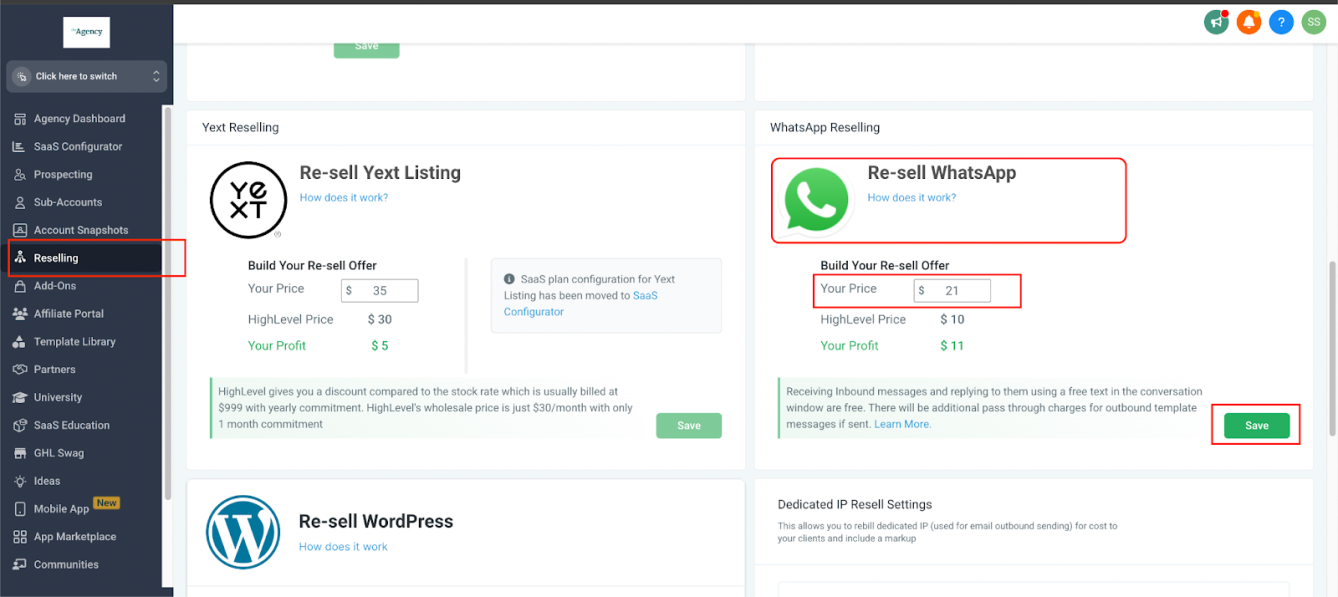
GHL sub-account settings — where Conversation AI is configured per channel (Source: GHL Official Docs)
Does It Actually Work? Honest Test Results
The most important question. Here is an honest breakdown based on real testing across different scenarios:
✅ Where It Works Exceptionally Well
Appointment booking — Excellent. For appointment booking, it handles the task efficiently — checking calendar availability, offering time slots, collecting necessary information, and sending confirmation messages. When a lead says “I’d like to book a consultation,” the bot checks your GHL calendar, offers available slots, confirms the booking, and sends a confirmation — all in under 60 seconds. This is genuinely impressive.
FAQ answering — Very Good. For questions like “What are your opening hours?”, “Do you offer free consultations?”, or “What does your service cost?” — the bot answers accurately and instantly when trained properly. Once you get it going, it learns and improves over time. This means the chatbot gets better at understanding and helping your customers the more it is used.
Lead qualification — Good. The bot reliably asks your defined qualification questions (budget, timeline, location, service type) and stores the answers in GHL contact fields. Qualified leads get routed to your pipeline, unqualified leads get a polite response. This saves your team hours of back-and-forth every week.
After-hours coverage — Excellent. This is where the ROI is clearest. A lead who messages at 11 PM on a Friday gets an instant, intelligent response. Without Conversation AI, they wait until Monday. With it, they are already booked in your calendar by Saturday morning.
⚠️ Where It Needs Careful Setup
Complex sales conversations — Mixed. As your requirements become more sophisticated, the learning curve steepens considerably. Building complex conversation logic, implementing effective intent recognition, and creating truly helpful responses requires significant time investment. For simple service businesses, the bot handles conversations well. For complex B2B sales with multiple decision-makers, custom pricing, and long sales cycles — a human is still needed.
External system integrations — Limited. If you need to integrate with external systems — perhaps pulling data from your accounting software or connecting to a custom API — you will find limitations. Whilst GoHighLevel offers webhooks and basic API functionality, complex integrations often require third-party tools like Zapier or Make.
❌ Where It Falls Short
Non-English languages. The bot is primarily trained for English. While it can respond in other languages, the accuracy, naturalness, and context retention drop noticeably in Arabic, Urdu, Hindi, and other languages. For businesses serving non-English primary markets, a specialized tool may be better for now.
Zero-training deployment. The most common complaint about GHL Conversation AI comes from users who deployed it with minimal setup. Without a properly written prompt and a trained Knowledge Base, the bot gives vague or incorrect answers. It is not plug-and-play — it requires 2–4 hours of initial setup to work well.
Want to try Conversation AI risk-free?
Get 30 days free access to GHL plus a live bootcamp where the team helps you set it up correctly from day one.
→ Get 30 Days Free Trial + Free Live BootcampConversation AI + GHL Workflows: The Real Power
Conversation AI on its own is useful. Connected to GHL workflows, it becomes transformative. Here are the most powerful combinations:
Combo 1: Lead Form → Instant WhatsApp Bot → Appointment Booked
Someone fills your Facebook Lead Ad form. GHL workflow triggers immediately, sending a WhatsApp message: “Hi [Name], thanks for your interest! I’m [Business Name]’s assistant — can I ask a couple of quick questions?” The Conversation AI takes over, qualifies the lead in 3–4 messages, and books a discovery call. All within 60 seconds of form submission, even at 2 AM.
Combo 2: No-Show → Bot Re-Engagement
When a contact is tagged “No Show” in your pipeline, a workflow fires sending an SMS from the Conversation AI: “Hi [Name], we missed you at your appointment! We have a few slots available this week — would any of these work for you?” The bot presents available times, handles responses, and rebooks — automatically.
Combo 3: Review Request → Bot Handles Response
After a service is marked complete in your pipeline, the workflow sends a review request. If the customer responds with questions instead of leaving a review, the Conversation AI handles those questions and loops back to the review request at the right moment.
Combo 4: Cold Lead Revival
Contacts that have not responded in 30 days get a workflow-triggered SMS from the bot: “Hi [Name], it’s been a while — we recently added [new service]. Would this be useful for your situation?” The AI holds the conversation, identifies renewed interest, and passes hot responses to your team.
Real Use Cases: Who Uses It and How
Dental and Medical Clinics
Clinics use Conversation AI on their website live chat and WhatsApp. When someone asks “Do you take new patients?” or “Is [procedure] covered by insurance?”, the bot answers instantly from the trained FAQ. For appointment requests, it checks the GHL calendar and books directly. Front desk staff handle only complex cases and in-person interactions.
Real Estate Agencies
When leads inquire about listings via Facebook Messenger, the bot asks: “Are you looking to buy or rent? What’s your budget range? Which area are you interested in?” It stores the answers in contact fields, tags the lead by budget range, and routes high-budget leads to senior agents immediately. Lower-budget leads go into a nurture sequence.
Marketing Agencies — Selling AI as a Service
After using Conversation AI in one business and helping other businesses implement it, it worked amazingly well across different industries. Whether clients were dentists or ran marketing agencies, the AI chatbot adapted and provided excellent service. Smart agencies package Conversation AI as a managed service — setting it up for each client, training it on their specific business, and charging $200–$500/month. The bot does the work; the agency collects the margin.
Home Service Businesses (Plumbing, HVAC, Cleaning)
These businesses get high inquiry volume but cannot always answer immediately. Conversation AI handles every inbound SMS and chat: “What’s your availability?”, “How much does a boiler service cost?”, “Do you cover [area]?” — answered instantly, 24/7. Booking requests go straight into the GHL calendar.
GHL Conversation AI vs Competitors
| Feature | GHL Conversation AI | Intercom AI | Tidio | ManyChat |
|---|---|---|---|---|
| Native CRM integration | ✅ Full GHL CRM | ⚠️ Own CRM only | ❌ Via Zapier | ❌ Via Zapier |
| Calendar booking | ✅ Native GHL | ⚠️ Limited | ⚠️ Integration needed | ❌ Not built-in |
| SMS channel | ✅ Yes | ❌ No | ⚠️ Via Twilio | ❌ No |
| ✅ Yes | ⚠️ Limited | ✅ Yes | ✅ Yes | |
| Instagram DM | ✅ Yes | ❌ No | ⚠️ Limited | ✅ Yes |
| Knowledge Base training | ✅ Upload docs/URLs | ✅ Yes | ⚠️ Limited | ❌ No |
| Workflow automation | ✅ Full GHL workflows | ⚠️ Own system | ⚠️ Basic | ✅ Yes |
| Agency multi-client | ✅ Sub-accounts | ❌ Extra cost | ⚠️ Limited | ✅ Yes |
| Monthly cost | Included in GHL | $39–$999+/mo | $29–$499/mo | $15–$135/mo |
GoHighLevel Conversation AI: Honest Pros and Cons
| ✅ Pros | ❌ Cons |
|---|---|
| Included in all GHL plans — no extra subscription | Requires proper training to work well — not plug-and-play |
| Native CRM integration — conversations update contacts automatically | Non-English language quality is inconsistent |
| Covers 6+ channels from one bot configuration | Complex external integrations need Zapier or Make |
| Suggestive Mode — safe way to test before full automation | Advanced setup (complex logic, branching) has a learning curve |
| Bot Trial — free testing before going live | Email channel still rolling out in 2026 (not fully available) |
| Works 24/7 — no missed after-hours leads | Generic answers without a properly trained Knowledge Base |
| Agency reselling — package as a service for $200–$500/mo per client | Max message count limit means long conversations need human handoff |
Final Verdict: Does GoHighLevel Conversation AI Actually Work?
Yes — it works. But the setup quality determines everything.
The agencies and businesses that say “GHL Conversation AI doesn’t work” are almost always using it with a 2-line prompt and zero Knowledge Base training. The ones who say “it’s incredible” have spent 3–4 hours setting it up properly.
Here is the honest summary: Conversation AI is not just a chat tool. It is part of your CRM system. That is a big deal for agencies and service businesses that want everything connected. When a lead responds at 2 AM, by morning the appointment is already on your calendar. That is not theoretical — it is exactly how it works when configured correctly.
For GHL users specifically, the value equation is unbeatable. It is included in your existing plan. There is no additional monthly fee. It covers SMS, WhatsApp, Instagram, Facebook, and Live Chat simultaneously. A comparable setup with separate tools — Tidio for chat, ManyChat for social, Twilio for SMS — would cost $100–$300/month extra and require Zapier to connect everything. GHL Conversation AI does all of it natively for $0 additional.
Start in Suggestive Mode. Train it properly for 2 weeks. Switch to Auto-Pilot. The ROI becomes immediately obvious.
Ready to Let AI Handle Your Conversations?
Try GoHighLevel free for 30 days — full access to Conversation AI, Voice AI, CRM, workflows, and every channel. Plus a live bootcamp to help you set it up the right way from day one.
→ Get 30 Days Free Trial + Free Live BootcampFrequently Asked Questions
Is GoHighLevel Conversation AI free?
Yes — Conversation AI is included in all GoHighLevel plans at no extra cost. You pay your standard GHL subscription ($97/mo Starter, $297/mo Pro, or $497/mo Agency), and Conversation AI is available inside every sub-account. Note that SMS and WhatsApp message costs still apply separately based on volume.
How long does it take to set up properly?
A basic bot that handles your most common FAQ questions and books appointments can be set up in 1–2 hours. A well-trained, fully optimized bot for a specific industry typically takes 3–4 hours of initial setup, plus 2 weeks in Suggestive Mode to review responses and improve the Knowledge Base before switching to Auto-Pilot.
Can Conversation AI book appointments automatically?
Yes. When connected to your GHL calendar, the bot can check availability, present time slots, confirm bookings, and send confirmation messages — completely automatically. The calendar connection is native to GHL with no additional integration required.
What happens when the AI does not know the answer?
You configure fallback behavior during setup. Options include: a graceful “I don’t have that information — a team member will follow up with you shortly” message, immediate human handoff based on specific trigger words, or an escalation workflow that notifies your team. The bot never goes silent — it always responds with something, even if it is a handoff message.
Can I use Conversation AI on WhatsApp?
Yes, but WhatsApp requires the separate GHL WhatsApp integration ($10/month per sub-account). Once connected, Conversation AI works on WhatsApp exactly like SMS — responding automatically to inbound messages, booking appointments, and qualifying leads through WhatsApp conversations.
How many channels can one bot cover simultaneously?
One Conversation AI bot configuration can cover all channels at once — SMS, WhatsApp, Facebook Messenger, Instagram DM, and Live Chat. You can also run different bots per channel using GHL’s multi-bot feature, which allows channel-specific bot control and different personas per platform.

I like how you emphasized that these tools aren’t magic out of the box. It’s easy to underestimate the importance of proper training and clear goals for AI performance, and your review really highlights that.
Glad that stood out 🙌 Proper setup and clear goals really make all the difference with AI performance!
This breakdown really hits on the core of what makes Conversation AI effective — it’s not magic, but when paired with a solid Knowledge Base and clear goals, it becomes a powerful lead qualification tool. The part about 60–80% of inquiries being handled automatically is a game changer for agencies looking to scale their support without burning out their team. Thanks for the honest take on both the strengths and limitations.
Appreciate it! Glad you found the balanced perspective helpful—AI works best with the right setup and strategy 🙌