

⚡ Quick Verdict
★★★★★
GoHighLevel AI Agents are no longer just chatbots. In 2026, they are fully autonomous digital employees — they answer calls, reply to texts, book appointments, qualify leads, and update your CRM, all without human involvement. For agencies and businesses, this is the single most impactful feature in the platform.
✅ Best For
- Agencies managing multiple clients
- Businesses with high call/message volume
- Anyone tired of missing leads
- SaaS resellers looking to add AI services
❌ Skip If
- Very low lead volume (under 10/week)
- No GHL account yet
- Need full human-only interactions
- Only need basic FAQ responses
In 2026, the biggest problem for businesses is not finding leads — it is responding to them fast enough. Studies show that if you do not follow up within 5 minutes of a lead coming in, your chances of closing that lead drop by over 80%. Most businesses are responding in hours, not minutes. Some never respond at all.
GoHighLevel AI Agents solve this problem permanently. Think of them as digital employees that never sleep, never take lunch breaks, and never miss a single lead — whether it comes in at 2am on a Sunday or during your busiest hour of the week.
In this guide, we cover everything: what GHL AI Agents are, the 4 types available in 2026, how to set each one up step by step, real use cases across industries, pricing, and who should use them.
What Are GoHighLevel AI Agents?
GoHighLevel AI Agents are intelligent, automated bots that live inside your GHL account and handle real-time conversations with your leads and customers. Unlike old-style chatbots that followed rigid scripts, GHL AI Agents use Natural Language Processing (NLP) and large language models (LLMs) to understand context, answer unpredictable questions, and take real actions inside your CRM.
They can:
- Answer inbound phone calls with a human-like voice
- Reply to SMS, WhatsApp, Facebook Messenger, Instagram DMs, and website chat
- Book appointments directly into your GHL calendar
- Qualify leads by asking specific questions
- Update contact records and trigger workflows automatically
- Transfer hot leads to a human when a specific keyword or condition is met
The 4 Types of GoHighLevel AI Agents in 2026
1. Voice AI Agent (AI Phone Receptionist)
The Voice AI Agent answers inbound phone calls 24/7 with a realistic, human-sounding voice. Response latency is under 600ms — fast enough that most callers cannot tell they are speaking to an AI. It greets the caller, qualifies their needs, books appointments, and transfers to a human if needed. This is GHL’s most-used AI Agent type in 2026.
2. Conversation AI Agent (SMS, Chat & Social)
The Conversation AI Agent handles text-based channels — SMS, website live chat, WhatsApp, Facebook Messenger, and Instagram DMs — all from one inbox. It responds instantly to inbound messages, answers FAQs from a knowledge base you upload, and triggers GHL workflows based on what the contact says.
3. Agent Studio (Advanced Custom Agents)
Agent Studio is GHL’s most powerful new feature in 2026. It is a visual drag-and-drop builder where you create fully custom AI agents with multiple nodes: LLM nodes for AI responses, Knowledge Base nodes for document-based answers, API nodes to connect third-party tools, Web Search nodes for real-time information, and Logic/Branching nodes for complex decision flows.
4. Reviews AI Agent
The Reviews AI Agent automatically responds to Google and Facebook reviews on behalf of your business — positive or negative — using AI-generated responses that match your brand tone. It saves hours of manual review management every week.
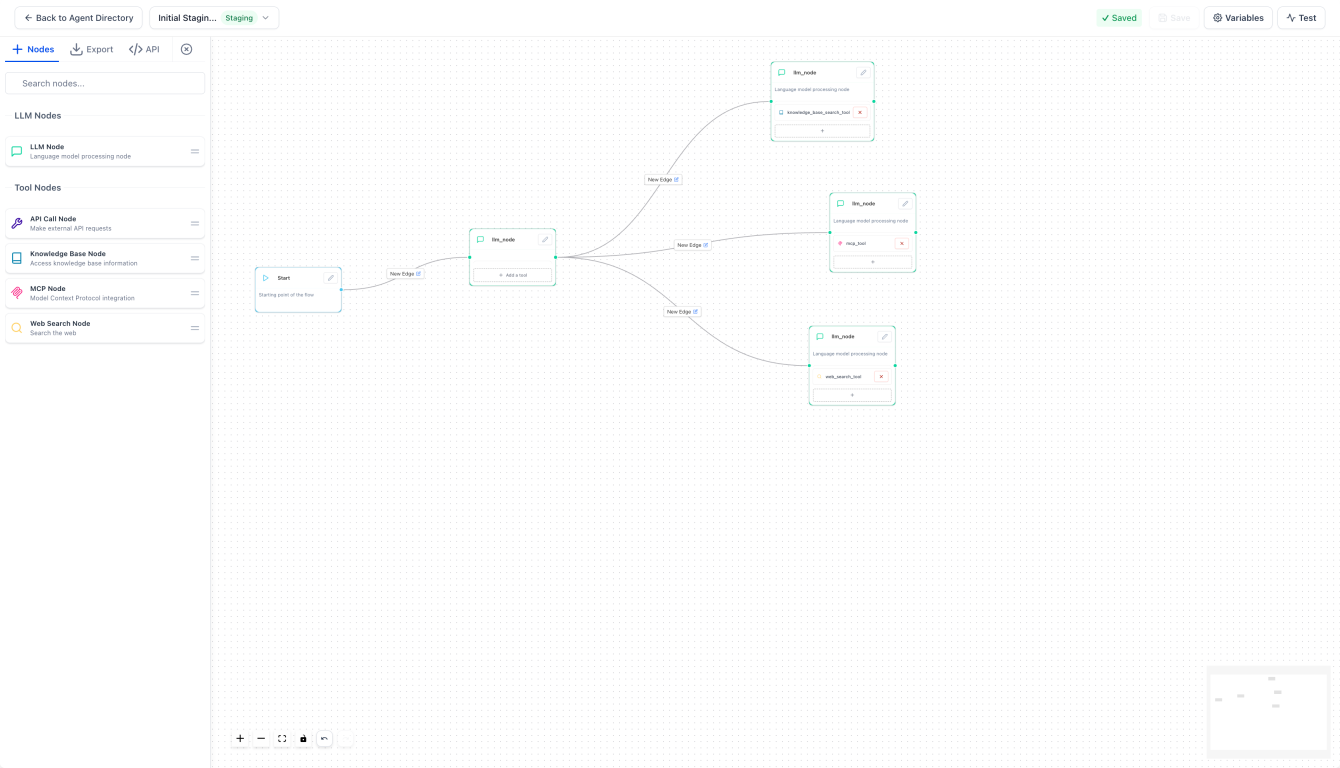
GoHighLevel Agent Studio — visual drag-and-drop builder for creating custom AI agents
Setting Up a Voice AI Agent: Step-by-Step
Voice AI is the most impactful agent to set up first. Here is the complete process:
Navigate to AI Agents → Voice AI
Log in to your GHL sub-account. Click AI Agents in the left sidebar, then select Voice AI. Click the + Create Agent button. You can either build from scratch or choose a prebuilt template from the Marketplace.
Configure Agent Details
Enter a name (e.g., “Main Receptionist”), your business name, and select a voice. GHL offers dozens of high-fidelity voices — male, female, professional, casual. Preview each one and pick what matches your brand. Set your timezone and choose your preferred LLM model.
Write Your Greeting Message
Customize the first thing your agent says. Example: “Hello, thank you for calling [Business Name]. I’m [Agent Name], your virtual assistant. How can I help you today?” Set a wait time before speaking to allow the call to fully connect.
Set Agent Goals
Choose Basic Mode or Advanced Mode. In Basic Mode, define what you want the agent to collect (name, email, service needed) and what action to take (book appointment, transfer to human, send SMS). In Advanced Mode, build branching flows for complex qualification sequences.
Upload Your Knowledge Base
Go to the Knowledge Base section and upload your business documents — pricing PDFs, service lists, FAQ documents, or paste your website URL. The agent reads this and uses it to answer caller questions accurately without hallucinating wrong information.
Configure Transfer Rules and Workflows
Set trigger keywords that escalate the call to a human — “emergency”, “complaint”, “speak to a person”, “urgent”. Connect post-call workflows: send a follow-up SMS, update a pipeline stage, add a contact tag, or email your team with a lead summary.
Assign a Phone Number and Set Business Hours
Assign any LC Phone or Twilio number in your account to the agent. Set the hours when the agent is active. Outside those hours, configure fallback routing — voicemail, another number, or keep the AI active 24/7.
Test Before Going Live
Use GHL’s built-in test feature to call the agent from the setup screen. Also place real test calls from different phone numbers. Test edge cases — callers who refuse to answer questions, unexpected topics, and after-hours scenarios. Fix any issues in the script before routing live traffic.
Setting Up a Conversation AI Agent
Go to AI Agents → Conversation AI → Create Bot
Select Prompt Based Bot or choose a Marketplace Template. Marketplace templates are pre-built for specific industries — dental, real estate, e-commerce, coaching — and save hours of setup time.
Select Your Channels
Choose which channels the bot will handle: SMS, Live Chat Widget, WhatsApp, Facebook Messenger, Instagram DM, or all of them. Each channel can have the same bot or different configurations.
Write Your Bot Prompt
Define your agent’s persona and instructions. Example: “You are Alex, a friendly assistant for [Business Name]. Your goal is to answer questions about our services, collect the visitor’s name and phone number, and book a consultation. Always be polite and professional.”
Add Training Data and FAQs
Go to the Training tab. Add your most common Q&A pairs directly or upload a document. The more specific your training data, the more accurate the bot’s responses. Also set Topics to restrict what the bot will and will not discuss.
Configure Goals and Actions
Set what the bot should try to accomplish — collect contact info, book an appointment, answer service questions. For each goal, configure the action that fires when it is achieved: create a contact, book a calendar slot, add a tag, start a workflow.
Test, Train and Go Live
Use the Test & Train tab to simulate real conversations. Review any responses where the bot gave incorrect answers and correct them. Once satisfied, toggle the bot to Live. It will now handle all new inbound messages on your selected channels automatically.
Agent Studio: Building Advanced Custom AI Agents
Agent Studio is GHL’s most advanced AI feature in 2026. It is a visual, no-code platform for building complex AI workflows that go far beyond what Voice AI and Conversation AI can do alone.
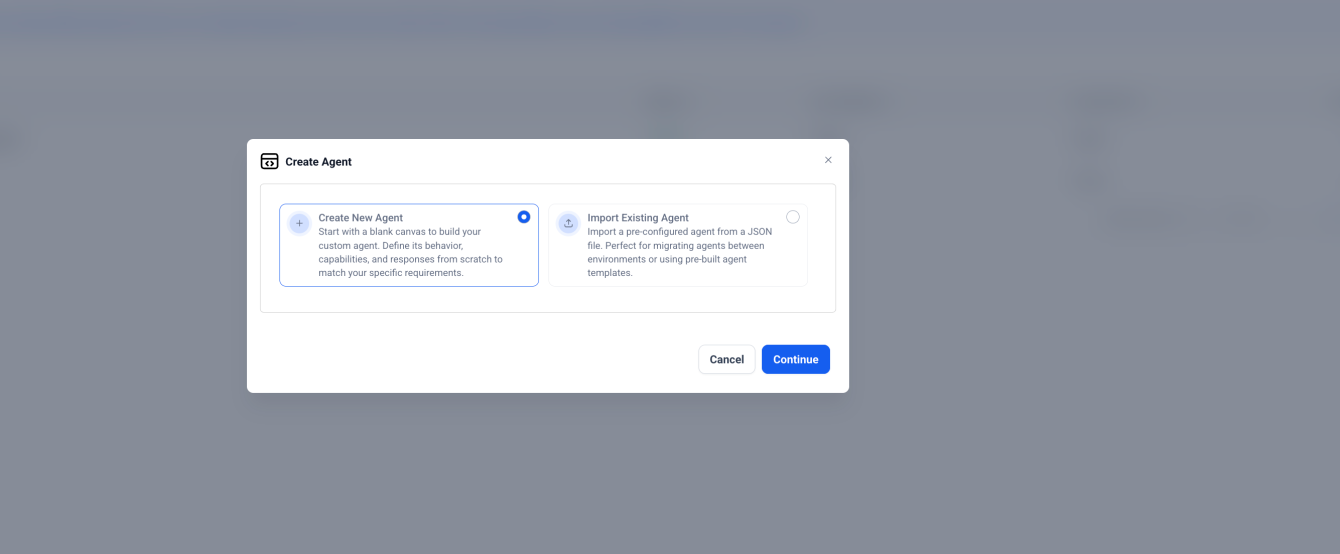
Agent Studio → Create Agent — visual canvas for building multi-node AI workflows
The 5 Node Types in Agent Studio
| Node Type | What It Does | Example Use |
|---|---|---|
| LLM Node | AI-powered responses using a large language model | Answer complex questions, generate content, qualify leads |
| Knowledge Base Node | Pulls answers from your uploaded documents | Answer pricing questions, service details, FAQs |
| API Node | Connects to third-party tools via API | Check stock, pull CRM data, trigger external apps |
| Web Search Node | Searches the internet for real-time information | Get current prices, news, live availability |
| MCP Tool Node | Integrates external tools via Model Context Protocol | Advanced integrations beyond standard APIs |
How to Set Up Agent Studio
Navigate to AI Agents → Agent Studio
Click Create Agent to open the drag-and-drop visual canvas. Agent Studio is currently available for Agency Admins and Agency Users only.
Add and Connect Tool Nodes
Drag nodes onto the canvas — start with an LLM node as the brain. Add a Knowledge Base node and connect it to the LLM. Add an API node if you need external data. Connect nodes with edges to define the logic flow.
Configure Variables
Set up global variables (e.g., contact_name, service_interest, budget) that pass data between nodes. Runtime variables update during the conversation. Input variables collect information from the user.
Set Up Branching Logic
Add edge conditions between nodes to create different paths based on responses. Example: if budget is under $500 → send to package A workflow. If budget is over $500 → send to premium package workflow.
Test in Staging, Then Promote to Production
Save your agent to create the Staging version. Use the Test Tab to simulate conversations and validate every branch. When everything works correctly, click Promote to Production. Your agent is now live.
Ready to deploy your first GHL AI Agent?
Get 30 days free access plus a live bootcamp to set everything up correctly from day one.
→ Get 30 Days Free Trial + Free Live Bootcamp to Launch HighLevel TogetherGoHighLevel AI Agents: Real Use Cases by Industry
Dental Clinics and Medical Practices
A dental clinic uses Voice AI to answer every inbound call — even during procedures when no staff can pick up. The agent greets the caller, asks what they need (new patient appointment, emergency, prescription refill), and books directly into the GHL calendar. After the call, a confirmation SMS is sent automatically. The clinic captures 40% more appointments from calls that previously went to voicemail.
Real Estate Agencies
A real estate team uses Conversation AI on their website chat and Facebook Messenger. When a lead inquires about a property listing, the AI instantly qualifies them — buyer or seller, price range, desired area, timeline — and books a discovery call with an agent. The Knowledge Base is loaded with all active listings so the bot can answer specific property questions without hallucinating wrong details.
Home Service Businesses (Plumbers, HVAC, Electricians)
A plumbing company runs Voice AI on their primary business number. During peak hours when technicians are in the field, every call is answered instantly. The AI qualifies the job (type of issue, address, urgency), provides estimated pricing from the knowledge base, and books the service appointment. Emergency calls trigger an immediate transfer to the owner’s mobile.
Marketing Agencies (SaaS Reselling)
An agency deploys AI Agents across 30+ client sub-accounts — each with its own Voice AI receptionist, Conversation AI for web chat, and Reviews AI for reputation management. The agency charges each client $297/month for “AI Employee” services, while the GHL cost is approximately $97/month per sub-account. The margin is pure recurring profit at scale.
E-Commerce Stores
An online store uses Conversation AI connected to their order management API via Agent Studio’s API Node. When a customer asks about their order status, the AI queries the API in real time and responds with accurate tracking information — no human agent required for the most common support question.
Coaching and Online Education
A business coach uses Conversation AI on their website to screen discovery call requests. The agent asks about business type, main challenge, monthly revenue, and goals. Qualified leads — those meeting specific criteria — are automatically booked into the coach’s calendar. Unqualified leads are redirected to a lower-ticket offer. Conversion rates improve because the coach only speaks to pre-qualified prospects.
GoHighLevel AI Agents Pricing: Full Breakdown
| AI Agent Type | Cost Model | Approximate Rate | Best Plan |
|---|---|---|---|
| Voice AI (per minute) | Usage-based | ~$0.06/min (voice + LLM tokens) | Starter or Pro |
| Unlimited AI Employees Plan | Flat monthly | $97/month per sub-account | High volume agencies |
| Conversation AI | Usage-based | ~$0.04–$0.07 per AI response | Starter or Pro |
| Agent Studio | Token-based (LLM usage) | Varies by LLM and node usage | Agency users only |
| Reviews AI | Included in AI Employee | Covered under $97/mo plan | Any plan |
| GHL Base Plan (required) | Monthly subscription | $97/mo (Starter) or $297/mo (Pro) | All users |
Agency Rebilling
On GHL Pro or Agency plans, you can rebill AI usage to your clients at any markup. Wholesale cost for Voice AI is approximately $0.06/minute. Agencies typically charge clients $0.15–$0.25/minute, creating a profitable margin on every AI conversation that runs in client accounts.
GoHighLevel AI Agents: Honest Pros and Cons
| ✅ Pros | ❌ Cons |
|---|---|
| All agents native to GHL — one platform, one inbox, one CRM | Agent Studio currently limited to Agency Admins and Users only |
| Voice AI latency under 600ms — sounds genuinely human | Voice AI requires LC Phone or Twilio numbers |
| No-code setup — drag-and-drop, no developer needed | Learning curve for Agent Studio’s node-based builder |
| Knowledge base upload prevents AI hallucinations | Usage-based costs can add up at high volume without flat plan |
| Marketplace templates for instant industry-specific setup | Voice AI primarily English — limited multilingual support |
| Agency rebilling creates new recurring revenue stream | Conversation AI responses can feel generic without thorough training |
| Version control in Agent Studio for safe testing | Reviews AI limited to Google and Facebook in 2026 |
Who Should Use GoHighLevel AI Agents?
✅ Perfect for you if:
- You miss calls, texts, or messages during busy hours or after business hours
- You are an agency that wants to offer AI services to clients as a premium add-on
- You want to automate lead qualification without hiring more staff
- You need to scale your business without scaling your headcount
- You want to generate recurring revenue by reselling AI Agents under your brand
❌ Skip it if:
- You receive fewer than 10 leads per week — the setup time is not worth it at very low volume
- You are not on GoHighLevel yet — the AI Agents only work inside the GHL ecosystem
- Your business requires all conversations to be handled exclusively by humans (e.g., legal or medical compliance)
Final Verdict: Are GoHighLevel AI Agents Worth It in 2026?
Yes — without question. GoHighLevel AI Agents are the most impactful feature in the platform in 2026.
The missed call problem alone costs most small businesses thousands of dollars every month. A Voice AI agent that answers every call, qualifies every lead, and books every appointment — 24 hours a day, 7 days a week — pays for itself with a single additional conversion per week.
What sets GHL’s AI Agents apart from standalone tools like Synthflow, VAPI, or third-party chatbots is the native integration. Every conversation automatically updates the CRM, triggers workflows, and feeds into your existing automation sequences — with zero third-party connections required.
Agent Studio takes this further still. The ability to build custom multi-node AI workflows with API connections, knowledge bases, branching logic, and version control — all without code — puts enterprise-level AI capability in the hands of any agency owner.
Start Your AI Agent Today
Try GoHighLevel free for 30 days. Get full access to Voice AI, Conversation AI, Agent Studio, and the complete platform — plus a free live bootcamp to launch everything correctly from day one.
→ Get 30 Days Free Trial + Free Live Bootcamp to Launch HighLevel TogetherFrequently Asked Questions
What is the difference between Voice AI and Conversation AI in GoHighLevel?
Voice AI handles inbound phone calls with a human-like voice. Conversation AI handles text-based channels — SMS, website chat, WhatsApp, Facebook Messenger, and Instagram DMs. Both live inside the same GHL inbox and CRM, but they serve different communication channels. Most businesses deploy both for complete coverage.
What is GoHighLevel Agent Studio?
Agent Studio is GHL’s advanced visual builder for creating custom AI agents. It uses a drag-and-drop interface with multiple node types — LLM, Knowledge Base, API, Web Search, and MCP — to build complex multi-step AI workflows without coding. It is more powerful than standard Voice AI or Conversation AI and is available to Agency Admins and Users.
How much does GoHighLevel Voice AI cost per minute?
Voice AI costs approximately $0.06 per minute for voice processing plus LLM token usage, on top of standard per-minute phone charges ($0.013–$0.021/min via LC Phone or Twilio). The Unlimited AI Employees plan at $97/month per sub-account removes per-usage limits for all AI Employee tools.
Can I use GoHighLevel AI Agents for outbound calls?
Yes. In 2026, GHL supports outbound AI calling triggered directly from the workflow builder. Outbound Voice AI is commonly used for lead follow-up, appointment reminders, and re-engagement campaigns. Compliance guardrails including call hour restrictions are built into the system.
Can agencies resell GoHighLevel AI Agents to clients?
Yes. GHL’s Agency Dashboard includes a Reselling section where you set pricing for AI Employee features per sub-account. You pay GHL the wholesale rate and charge your clients any markup. This creates a recurring AI services revenue stream that compounds as you grow your client roster.
Do GoHighLevel AI Agents work in languages other than English?
As of March 2026, Voice AI is primarily optimized for English with limited support for other languages. Conversation AI has broader language support through its LLM models, but performance is strongest in English. For non-English markets, thorough testing is recommended before going live.



The 5-minute rule for responding to leads really hit home. With so many businesses struggling to respond quickly enough, having an AI that never sleeps seems like the perfect solution. Curious how these AI agents handle more complex customer inquiries.
Great point! 🙌 That’s exactly where AI shines—handling instant replies while still managing complex queries with smart workflows and human fallback when needed.
This breakdown of GoHighLevel AI Agents 2026 really highlights how far the platform has evolved—from basic chatbots to full-fledged autonomous agents. The emphasis on lead response time is spot-on; missing a lead within the first 5 minutes is a huge missed opportunity, and having AI handle that instantly is a game-changer. I especially appreciate the practical use cases shared—this kind of detailed setup guidance makes it easy to see how agencies and SaaS resellers can implement these tools effectively.
Appreciate the thoughtful feedback! You nailed it—speed to lead is everything, and that’s where these AI agents really shine. Glad the use cases and setup insights helped make the potential more practical 🙌